In a previous post, I described updates we have made to our Dickinson Chatbot. There are other free chatbots that can be used for practicing foreign languages as well, that you may prefer. The best one I’ve seen is from AI School. For most faculty here, we won’t run into caps on their free version because it is based on student sessions per day. Though as with all freemium models, they may change these terms once they’ve expanded their user base.
I’ve made few if you’d like to see how it works from a student’s perspective.
AI School also gives you the ability to create a system prompt that governs the chatbot, specifying the language, topic, level of your students, and any grammar or vocabulary you would like to have the chatbot focus on. AI School calls their chatbots “sidekicks”. To create your own:
- Go to https://app.schoolai.com/ and create an account.
- Top right there’s a button :
- You want a “Sidekick”
- Fill out text area for “What do you want Sidekick to do with your students?”. This is your system prompt. “You’re a native Spanish speaker happy to help beginning language learners. Keep your responses short and simple. Ask and answer questions to our students about past events” etc.
- Note there are additional text areas below to be more specific under “More Options”. You can also preview your chatbot/sidekick on the right to see how it behaves with different prompts.
- When you’re ready:
- Click the Launch button.
- Choose the option to Use a Space Code
- Copy the link and distribute to your students.
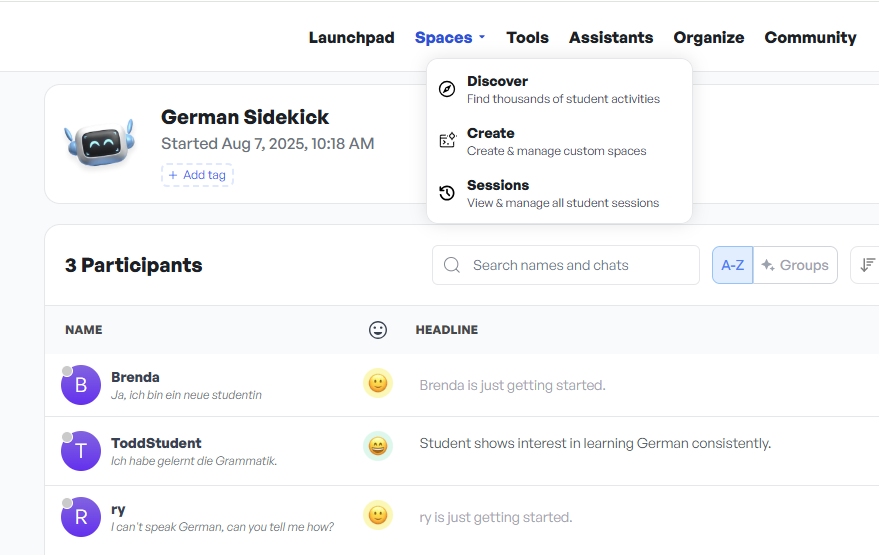
- You can then view the transcripts of your students via the top menu under Spaces -> Sessions. Choose your chatbot/sidekick and you’ll see something like this screen below.
I’d be happy to hear your thoughts comparing this chatbot to the Dickinson chatbot. I find the interface nicer. The language quality seems about the same. Either is capable of providing our students with immediate feedback that was not available before outside of class. If you have prompts to share, leave them in the comments below.