
The Smooth-Q is a handheld gimbal that stabilizes your smartphone for smooth, professional-looking video. You might choose the Smooth-Q when you want to eliminate shaky footage, create cinematic movement, or record on the go with ease. It’s perfect for class projects, interviews, event coverage, or any mobile video where smooth motion matters.
This tutorial will help you get started with the Smooth-Q. Follow the steps below to set up, balance, and record stabilized video with your smartphone.
1. Getting Started
- Charge the Smooth-Q fully using the included USB cable
- Attach your smartphone securely using the clamp
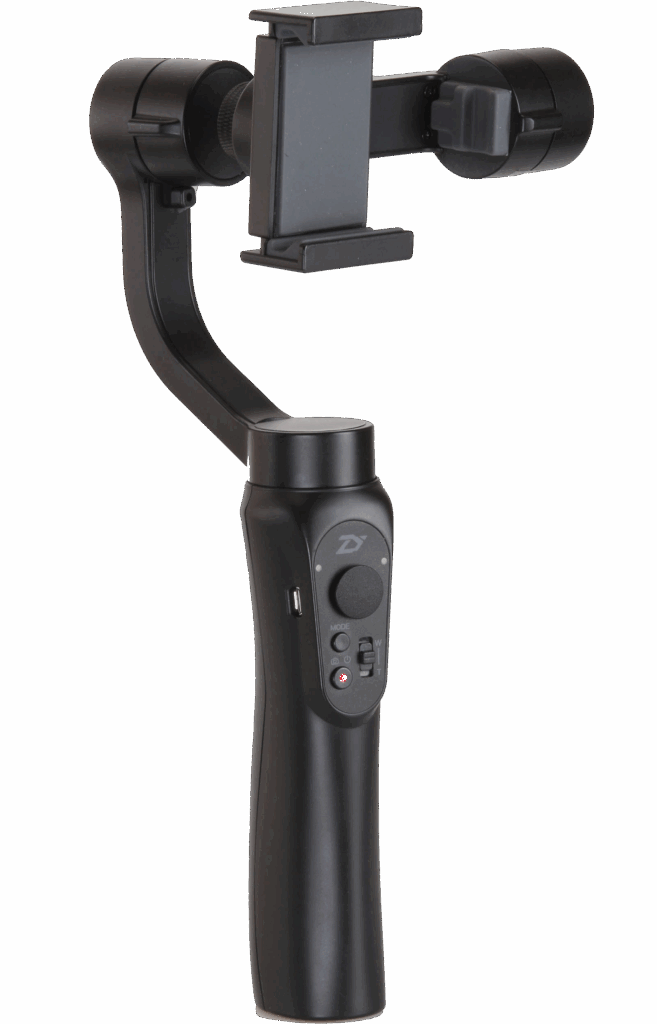
2. Balancing Your Phone
- Adjust the phone clamp so your device is centered
- Tilt, pan, and roll the gimbal manually until the phone remains level
- Proper balance reduces motor strain and ensures smoother video
3. Connecting to the App
- Download the ZY app on your phone

- With your phone balanced, turn on the gimbal by pressing and holding the power button
- Through the app, connect your phone via Bluetooth to the gimbal
- Explore camera settings and shooting modes within the app
4. Recording Video
- Use the joystick and buttons on the gimbal to control pan, tilt, and zoom
- Start recording via the app or gimbal button
- Move slowly and smoothly for cinematic results
5. Modes and Features
- Follow Mode: Gimbal follows your movements smoothly
- Lock Mode: Keeps the camera fixed on one direction
- Panoramic / Timelapse: Use app features for creative shots
- Switch between modes using the gimbal’s mode button
Helpful Tips
- Always balance your phone before powering on
- Keep movements slow to avoid jerky footage
- Use a lightweight case or remove it to improve balance
- Charge both your phone and gimbal before long shoots
You’re Ready to Record
The Smooth-Q phone gimbal makes it easy to capture stable, cinematic video with just your smartphone. Start with simple shots, explore different modes, and gradually experiment with creative angles and movements. With practice, your mobile videos will look professional every time.
The below video walks you through the basics of setting up and using the Smooth Q.