Background – This demonstration is one simplified theoretical example of how students can use AI to improve their research and also layout the process broadly step by step. As of now, all the tools mentioned below are free to use the way I describe for the general public. Some of these tools are “freemium” models meaning they have paid versions with more capabilities. With freemium models, they sometimes further restrict the free capabilities once they have a larger user base.
It is important to explain to students that AI models are not really “intelligent” in the sense they have logic etc. Instead they are prediction engines, responding with the most likely text for a given prompt. This is way they are generally vague yet authorative sounding. The engines will nearly always generate a response regardless of it’s certainty. Therefore, any facts need to be double checked elsewhere.
For my hypothetical situation, I’m imagining a student interested in the poet Michael Field. Michael Field is a pseudonym for two lesbian poets, Katherine Harris Bradley and Edith Emma Cooper. The student would like learn more about Michael Field particularly how Michael Field influenced and was influenced by other writers at the time by finding common themes of the era and looking at how Michael Field approached these themes in comparison to their contemporaries. If you are interested in more quantitative AI tools, skip to the bottom to the “Further Notes” section.
Step 1 background – I want to begin background reading on the poet Michael Field, contemporaries in contact with Michael Field, and common themes of the era in general and of Michael Field’s poetry specifically. I would suggest using Perplexity or Copilot within the Edge browser with the prompt as “Student” below for a few reasons:
- Perplexity and Edge both provide citations for their response, which I’ve added below in the exchange for better readability. Important caveat, AI generators are only utilizing plain text on the web, not including full pdf texts from Google Scholar etc. Perplexity does provide an option to “Focus” on “Academic” sources. These include SemanticScholar and Arxiv because they have plain text versions of the articles openly available. So although far from comprehensive, still helpful at this stage.
- Perplexity also provides a section just below with possible follow up prompts or questions.
- I specifically ask for a number of examples in the prompt. In general, the more specific you can be with AI the better, and one of the most common ways is to specify length, amount, number, etc.
I start by asking Perplexity to provide a short bio of Michael Field, common themes in their poetry and a list of their contemporaries. Once I have some background, I use Perplexity to generate possible search terms as well. The example for finding a list of search terms is below.
Student: I am interested in finding articles about homosexuality in poetry during the Victorian era. Please provide 15 potential search terms I can use for library databases.
Perplexity: Here are 15 potential search terms for finding articles about homosexuality in poetry during the Victorian era:
-
- Victorian homosexual poetry
- Homosexuality in Victorian poetry
- Victorian homoerotic literature
- Gay themes in Victorian poetry
- Same-sex love in Victorian poems
- Queer representation in Victorian poetry
- LGBTQ+ themes in 19th-century poetry
- Victorian poets and homosexuality
- Homosociality in Victorian literature
- Male-male desire in Victorian poems
- Victorian era and homosexual verse
- LGBTQ+ poets in the 1800s
- Victorian attitudes towards same-sex love in poetry
- Homoeroticism in 19th-century literature
- Gender and sexuality in Victorian poems
These search terms can be used to explore various library databases and academic resources for articles and materials related to homosexuality in poetry during the Victorian era.
Sources:
Related:
-
- victorian poets who wrote about homosexuality
- how did victorian society view homosexuality
- the role of poetry in the victorian era
Step 2 – Database search
From my brief and very general background reading, I’ve prepared sets of search terms I can use for finding potentially related articles using our library’s databases. When searching the databases, I want to save the full PDF texts of potential articles into one folder. I’m going to then open each article with the Edge browser, ask for a summary and potential follow up questions. If it is likely useful, I will keep it in the folder for closer reading. If not, I will delete it from the folder.
As an example, I’m going to use the article “Queer temporality in Victorian love and marriage poems”. I open the file with Edge.
Student:
Please summarize this article in three paragraphs.
Edge:
Here is a summary of part 1 of the article:
-
-
- The authors examine how Victorian poets Tennyson, Meredith, and Michael Field use amatory lyric to question the institution of marriage and the linear telos associated with it.
- They argue that these poets employ a queer temporality that does not move forward in its trajectory but moves through repetition as a way to undermine the heteronormative expectations of marriage and reproduction.
- They focus on how Tennyson’s In Memoriam, Meredith’s Modern Love, and Michael Field’s Long Ago reshape the expectations of writing about nineteenth-century desire and offer new possibilities for different kinds of love and marriage poems.
See more:
-
-
- Part 2 discusses the epithalamium genre, which is a type of wedding song or poem that celebrates the passage of the bride from virginity to marriage and motherhood. The authors explain that epithalamia often follow a three-stage structure: the procession, the threshold, and the chamber.
- The authors argue that Tennyson’s In Memoriam, Meredith’s Modern Love, and Michael Field’s Long Ago can be read as epithalamic revisions that challenge the conventional expectations of marriage and sexuality in the Victorian era. They show how these texts use the epithalamium form to express grief, loss, betrayal, and desire, as well as to imagine alternative forms of kinship and futurity.
- The authors also explore how these texts engage with queer temporality, which is a concept that questions the linear and progressive model of time that underlies normative narratives of marriage and history. They suggest that these texts disrupt the teleology of heterosexual marriage by invoking the past, the future, and the cyclical in their epithalamic visions.
Student:
Write a short a short biography of Tennyson along with some of the writer’s common themes
Edge:
Alfred, Lord Tennyson was an English poet born on August 6, 1809, in Somersby, Lincolnshire, England [1]. He was the fourth of twelve children and demonstrated his literary talents quite early, writing a drama in blank verse and a 6000-line epic poem by the age of fourteen [1]. Tennyson enrolled at Trinity College, Cambridge, where he won the Newdigate Prize for poetry in 18291. His volume Poems, Chiefly Lyrical was published in 1830, but it made no significant impression on the reading public [1]. In 1832, Poems by Alfred Tennyson was published, in which early versions of many of his finest pieces appeared, including “The Lady of Shalott,” “The Palace of Art,” “The Lotos-Eaters,” “Oenone,” and “A Dream of Fair Women” [1]. Tennyson’s literary style is representative of the Victorian age, dealing with the reign of order: the law of the spiritual world and exercising the flawless man [2]. Many of his poems are about the temptation to give up and fall prey to pessimism, but they also extol the virtues of optimism and discuss the importance of struggling on with life [3]. The need to persevere and continue is the central theme of In Memoriam and “Ulysses” (1833), both written after Hallam’s death [3].
[1]cliffsnotes.com
[2]litpriest.com
[3]sparknotes.com
Student:
Write a short a short biography of Meredith along with some of the writer’s common themes
Edge:
George Meredith was an English novelist and poet of the Victorian era, born on February 12, 1828, in Portsmouth, Hampshire, England [1]. His novels are noted for their wit, brilliant dialogue, and aphoristic quality of language. Meredith’s novels are also distinguished by psychological studies of character and a highly subjective view of life that, far ahead of his time, regarded women as truly the equals of men [1]. His best-known works are The Ordeal of Richard Feverel (1859) and The Egoist (1879) [2].
Meredith’s writing reflects many of the concerns and themes of the Victorian period, such as social change, the role of women in society, and the impact of industrialization on the working class [3]. He was also known for his innovative style, which was noted for its syntactic complexity [2].
Some of the common themes in Meredith’s works include the struggle between idealism and realism, the conflict between the individual and society, and the tension between the old and the new [4]. His works often explore the complexities of human relationships, particularly those between men and women [3].
[1] britannica.com
[2]en.wikipedia.org
[3]poemanalysis.com
[4]poetryfoundation.org
Student:
What is an epithalamium? Was it a common genre in the Victorian era for writers? How did these authors use epithalamiums differently?
Edge:
An epithalamium is a poem that is written specifically for the bride on the way to her marital chamber [1]. It is a form of poetry that has been popular throughout history, and it was especially popular in ancient Greece and Rome [1]. The Roman poet Catullus wrote a famous epithalamium, which was translated from or at least inspired by a now-lost work of Sappho [1].
In the Victorian era, the novel was the leading literary genre in English, but poetry and theatre were also present [2]. The use of epithalamiums was not as common in the Victorian era as it was in ancient times, but some poets did use the form. For example, Alfred Lord Tennyson wrote an epithalamium called “The Marriage of Geraint” [3].
Victorian writers used epithalamiums differently depending on their individual styles and interests. Some used the form to celebrate the joys of marriage, while others used it to explore the complexities of human relationships [2]. Elizabeth Barrett Browning, for example, wrote an epithalamium called “The Soul’s Expression” that explores the idea of love as a spiritual force [4].
[1] Wikipedia
[2] Poetry Foundation
[3] Victorian Web
[4] Poem Analysis
Note – This line below from the AI is incorrect and a good example of how errors (hallucinations in AI jargon) can sound believable but be fictitious.
Elizabeth Barrett Browning, for example, wrote an epithalamium called “The Soul’s Expression” that explores the idea of love as a spiritual force [4]
At this point, I’m confident the article is useful. It includes Michael Field and how their contemporaries shared a common theme and genre. Now I can also use Edge to ask questions about portions of the text I find difficult.
Student:
Could you rephrase this line from the text? What is a telos? Why is this important?
“If Victorian marriage as a story of progress performs a reproductively-focused narrative – thus mirroring the heteronormative trajectory of courtship, marriage, and finally reproduction – then by reading these poems as cyclical rather than linear in nature, we can reevaluate their framing of marriage as a way to resist such telos.”
Edge:
Certainly! Here’s a rephrased version of the sentence: “If we view Victorian marriage as a story of progress that follows a linear, reproductively-focused narrative, then by reading these poems as cyclical instead, we can reassess how they frame marriage as a way to resist this narrative.”
In this context, telos refers to the idea of a final goal or end point [1]. The author is suggesting that Victorian marriage was often portrayed as a linear progression towards reproduction, which reinforces the idea of heteronormativity [2]. By reading these poems as cyclical, the author argues that we can challenge this narrative and view marriage in a different way [2].
[1] Merriam-Webster
[2] JSTOR
Litmaps
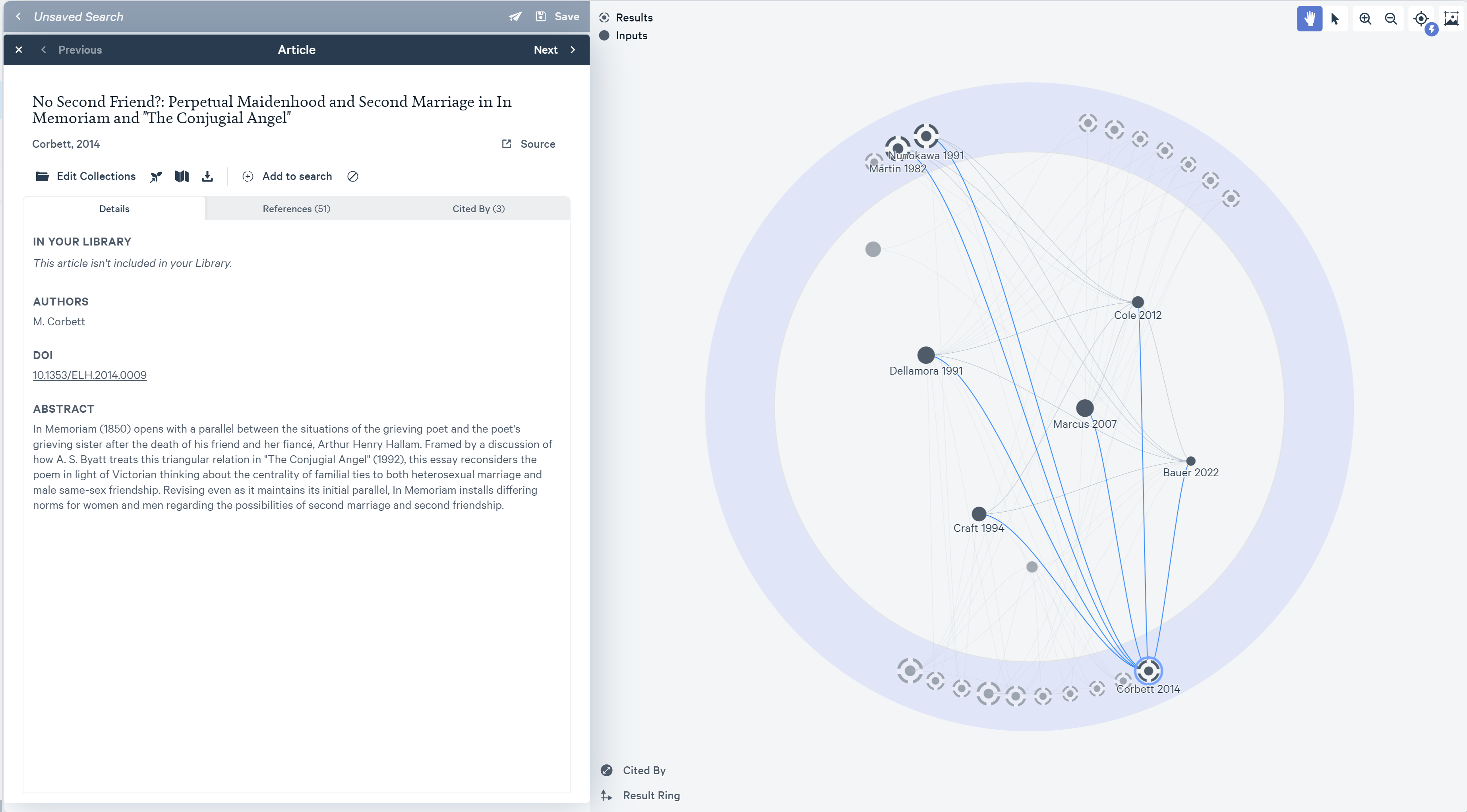
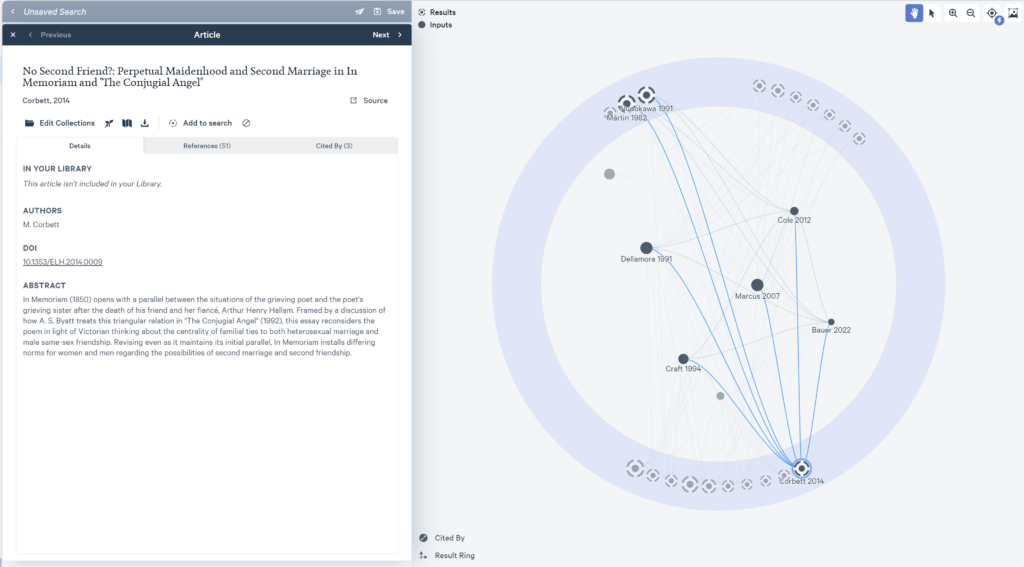
Using the more focused collection of articles from my database search, I’d like to see if I missed anything by searching via a different method. My example article is my most relevant article, so I’m going to start there. I go through the Notes section of the article and pull out references that are most likely to meet my goal of finding information on Michael Field, their use of themes and genres common to the era in comparison, and how they compared to their contemporaries. We’re going to use Litmaps and it’s Discover function. I will add this paper and six others from the notes section of my article and have it generate the network visualization with each paper being a node/dot connected via their citations. Nodes in the center are articles I added, those on the outside are suggested articles from Litmaps. If you select one of those articles, it displays the information about the article on the left and shows how it is related to the other articles via citations by default. I can than use this interface to find additional related articles and follow the same process above.
Further Notes
This theoretical process doesn’t cover all of the common use cases for using AI in student and faculty research. In the examples above, I limited the querying and summary of PDFs to a single file at a time. Germini (formerly Google’s Bard) has a feature that lets you do the same for a collection of PDFs shared within a folder on Google Drive. I wrote about this earlier on the blog, scroll down to the section on “Summarizing text for research“.
Edge and Gemini now both also have the capability to accept images for analysis and summaries. They both worked quite well on basic infographics. If anyone tries either using a more complicated chart including math equations, I’d appreciate hearing about results.
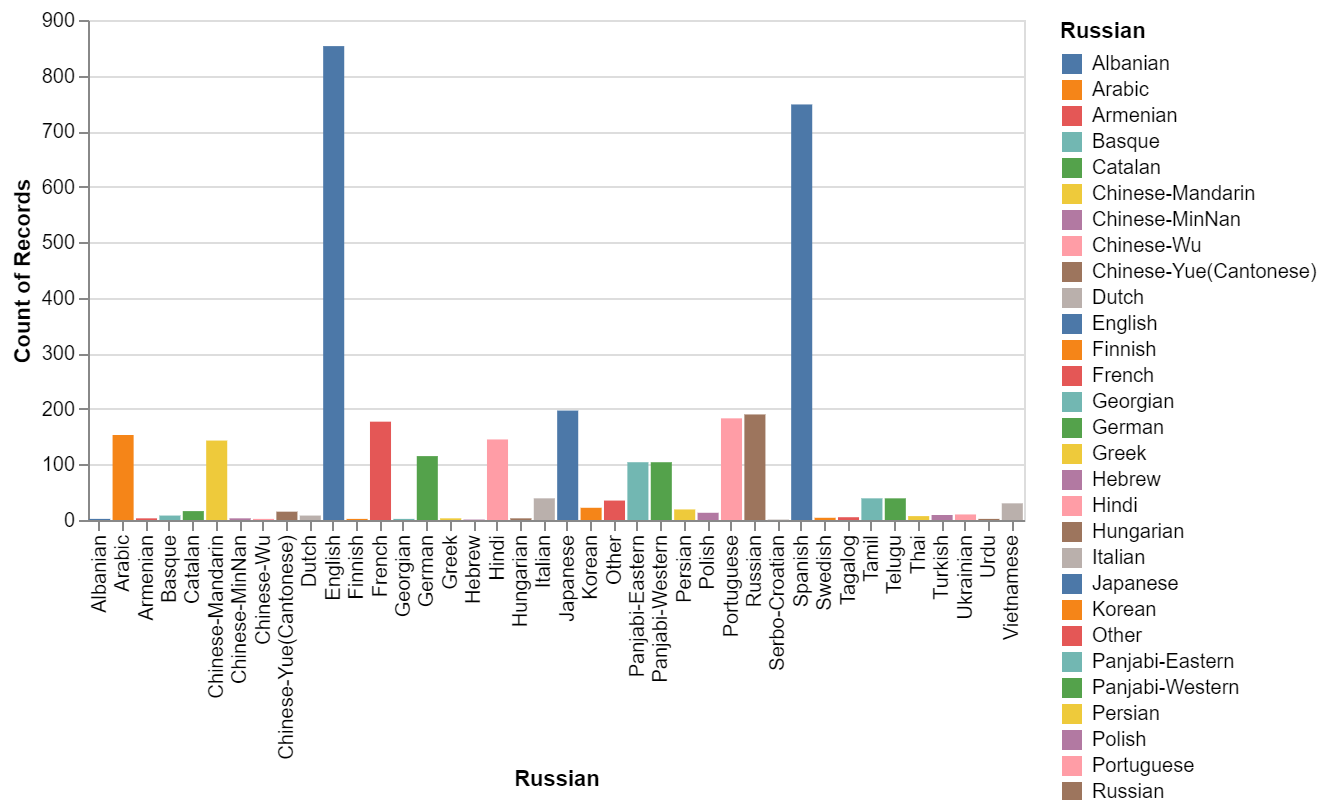
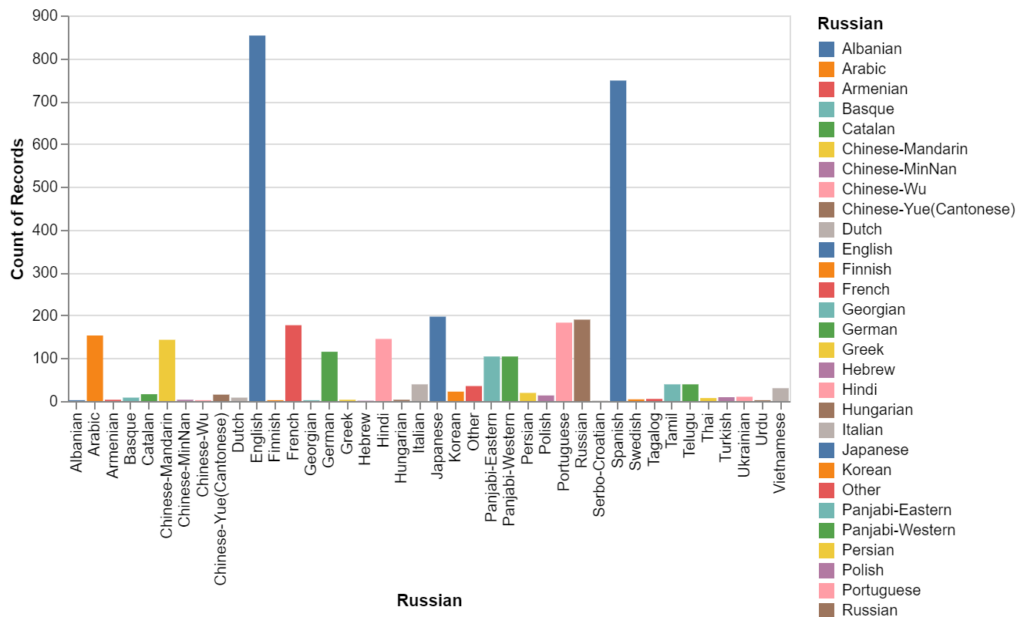
There are also tools designed specifically for quantitative functions. EinBlick is a standalone site for creating charts and visualizations using an Excel spreadsheet or share Google sheet. The chart below was created with a Google Sheet using the following prompt.
“show me a bar chart of the number of messages by language use a different color for each bar”
Finally, SciSpace does a little of all of the above allowing you to question and summarize PDFs, ask for explanations within the text, and interpret data. However, it focuses only on the sciences. Also note they changed their url from SciSpace to be https://typeset.io/. As of now, the free version is still quite generous, though I believe this is likely to change.
Hopefully this has been helpful. If you have other suggestions or feedback, please leave a comment below or email me at bryantt@dickinson.edu.